审计包依赖是否存在安全漏洞
目录
关于安全审计
🌐 About security audits
安全审计是对软件包依赖进行安全漏洞评估的过程。安全审计通过帮助你发现并修复依赖中的已知漏洞,从而保护使用你软件包的用户,这些漏洞可能导致数据丢失、服务中断、未经授权访问敏感信息或其他问题。
🌐 A security audit is an assessment of package dependencies for security vulnerabilities. Security audits help you protect your package's users by enabling you to find and fix known vulnerabilities in dependencies that could cause data loss, service outages, unauthorized access to sensitive information, or other issues.
使用 npm audit 进行安全审计
🌐 Running a security audit with npm audit
注意: npm audit 命令在 npm@6 中可用。要升级,请运行 npm install npm@latest -g。
npm audit 命令 将你包中配置的依赖描述提交到你的默认注册表,并请求已知漏洞报告。npm audit 会检查直接依赖、开发依赖、打包依赖和可选依赖,但不会检查对等依赖。
🌐 The npm audit command submits a description of the dependencies configured in your package to your default registry and asks for a report of known vulnerabilities. npm audit checks direct dependencies, devDependencies, bundledDependencies, and optionalDependencies, but does not check peerDependencies.
npm audit 会在你使用 npm install 安装软件包时自动运行。你也可以在你本地安装的软件包上手动运行 npm audit,以进行软件包的安全审查,并生成依赖漏洞报告,如果有的话,还会提供建议的修复措施。
- 在命令行中,通过输入
cd path/to/your-package-name并按 回车,导航到你的包目录。 - 确保你的包中包含
package.json和package-lock.json文件。 - 输入
npm audit并按 回车。 - 查看审计报告并运行推荐的命令或在需要时进一步调查。
解决 EAUDITNOPJSON 和 EAUDITNOLOCK 错误
🌐 Resolving EAUDITNOPJSON and EAUDITNOLOCK errors
npm audit要求软件包必须包含package.json和package-lock.json文件。
- 如果出现
EAUDITNOPJSON错误,请按照“创建 package.json 文件”中的步骤创建一个package.json文件。 - 如果你遇到
EAUDITNOLOCK错误,请确保你的包中有一个package.json文件,然后通过运行npm i --package-lock-only来创建包锁文件。
审查和处理安全审计报告
🌐 Reviewing and acting on the security audit report
运行 npm audit 将生成一份安全漏洞报告,报告中包含受影响的软件包名称、漏洞严重性和描述、路径及其他信息,如果可用,还会提供应用补丁以解决漏洞的命令。有关审计报告中各字段的更多信息,请参阅“关于审计报告”
🌐 Running npm audit will produce a report of security vulnerabilities with the affected package name, vulnerability severity and description, path, and other information, and, if available, commands to apply patches to resolve vulnerabilities. For more information on the fields in the audit report, see "About audit reports"
发现建议更新的安全漏洞
🌐 Security vulnerabilities found with suggested updates
如果发现安全漏洞并且有可用更新,你可以:
🌐 If security vulnerabilities are found and updates are available, you can either:
- 运行
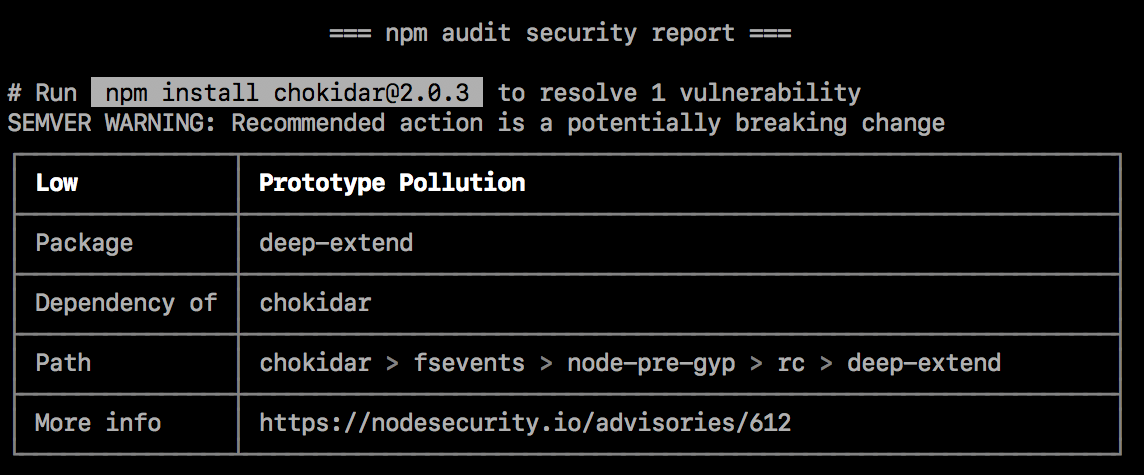
npm audit fix子命令以自动安装易受攻击依赖的兼容更新。 - 请单独运行推荐的命令以安装易受攻击依赖的更新。(某些更新可能会引入语义化版本不兼容的更改;更多信息,请参见“SEMVER 警告”。)
SEMVER 警告
🌐 SEMVER warnings
如果推荐的操作可能是破坏性更改(语义版本的主要更改),则后面会跟一个 SEMVER WARNING,提示“SEMVER 警告:推荐操作可能是破坏性更改”。如果存在漏洞的包更改了其 API,你可能需要对自己包的代码做额外修改。
🌐 If the recommended action is a potential breaking change (semantic version major change), it will be followed by a SEMVER WARNING that says "SEMVER WARNING: Recommended action is a potentially breaking change". If the package with the vulnerability has changed its API, you may need to make additional changes to your package's code.
发现需要人工审核的安全漏洞
🌐 Security vulnerabilities found requiring manual review
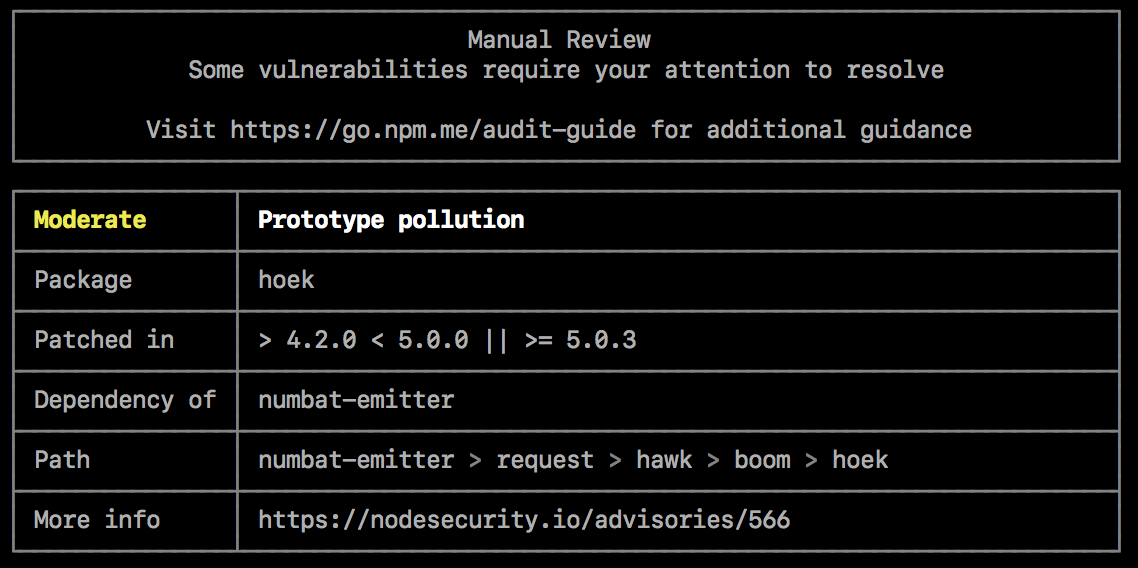
如果发现安全漏洞,但没有可用的补丁,审核报告将提供有关漏洞的信息,以便你进一步调查。
🌐 If security vulnerabilities are found, but no patches are available, the audit report will provide information about the vulnerability so you can investigate further.
要解决该漏洞,你可以
🌐 To address the vulnerability, you can
检查缓解因素
🌐 Check for mitigating factors
请查看“更多信息”字段中的安全通告,了解可能允许在有限情况下继续使用存在漏洞的包的缓解因素。例如,该漏洞可能仅在代码在特定操作系统上运行时,或调用特定函数时存在。
🌐 Review the security advisory in the "More info" field for mitigating factors that may allow you to continue using the package with the vulnerability in limited cases. For example, the vulnerability may only exist when the code is used on specific operating systems, or when a specific function is called.
如果存在修复则更新依赖包
🌐 Update dependent packages if a fix exists
如果存在修复程序,但依赖于具有漏洞的程序包的程序包尚未更新以包含固定版本,则你可能希望在依赖程序包存储库上打开拉取或合并请求以使用固定版本。
🌐 If a fix exists but packages that depend on the package with the vulnerability have not been updated to include the fixed version, you may want to open a pull or merge request on the dependent package repository to use the fixed version.
- 要找到必须更新的包,请检查“路径”字段中有漏洞的包的位置,然后检查依赖它的包。例如,如果漏洞的路径是
@package-name > dependent-package > package-with-vulnerability,则需要更新dependent-package。 - 在 npm 公共注册表 上,找到依赖的包并转到其仓库。有关查找包的更多信息,请参见“搜索和选择要下载的包”。
- 在依赖包存储库中,打开拉取或合并请求以将易受攻击的包的版本更新为具有修复的版本。
- 一旦拉取请求或合并请求被合并,并且包已在 npm 公共注册表 中更新,请使用
npm update更新你本地的包。
修复漏洞
🌐 Fix the vulnerability
如果修复不存在,你可能希望在包存储库的拉取或合并请求中向包维护者建议解决漏洞的更改。
🌐 If a fix does not exist, you may want to suggest changes that address the vulnerability to the package maintainer in a pull or merge request on the package repository.
- 检查“路径”字段以了解漏洞的位置。
- 在 npm 公共注册表 中,找到具有漏洞的软件包。有关查找软件包的更多信息,请参见“搜索和选择要下载的软件包”。
- 在包存储库中,打开拉取或合并请求以对包存储库进行修复。
- 合并修复并在 npm 公共注册表中更新包后,使用修复更新依赖于包的包副本。
在包或依赖包问题跟踪器中打开问题
🌐 Open an issue in the package or dependent package issue tracker
如果你不想自己修复漏洞或更新依赖包,请在包或依赖包问题跟踪器中打开问题。
🌐 If you do not want to fix the vulnerability or update the dependent package yourself, open an issue in the package or dependent package issue tracker.
- 在 npm 公共注册表 上,找到存在漏洞的包或需要更新的依赖包。有关查找包的更多信息,请参阅“查找和选择要下载的包”。
- 在软件包或依赖软件包的问题追踪器中,打开一个问题,并包含来自审核报告的信息,包括“更多信息”字段中的漏洞报告。
未发现安全漏洞
🌐 No security vulnerabilities found
如果未发现安全漏洞,这意味着在你的包依赖树中未发现已知漏洞的包。由于咨询数据库可能随时更新,我们建议定期手动运行 npm audit,或将 npm audit 添加到你的持续集成过程中。
🌐 If no security vulnerabilities are found, this means that packages with known vulnerabilities were not found in your package dependency tree. Since the advisory database can be updated at any time, we recommend regularly running npm audit manually, or adding npm audit to your continuous integration process.

在安装软件包时关闭 npm audit
🌐 Turning off npm audit on package installation
安装单个包
🌐 Installing a single package
在安装单个软件包时,要关闭 npm audit,请使用 --no-audit 标志:
🌐 To turn off npm audit when installing a single package, use the --no-audit flag:
npm install example-package-name --no-audit
有关更多信息,请参阅 npm-install 命令。
🌐 For more information, see the npm-install command.
安装所有包
🌐 Installing all packages
要在安装所有包时关闭 npm audit,请在你的用户和全局 npmrc 配置文件中将 audit 设置为 false:
🌐 To turn off npm audit when installing all packages, set the audit setting to false in your user and global npmrc config files:
npm set audit false
有关更多信息,请参阅 npm-config 管理命令 和 npm-config 审计设置。
🌐 For more information, see the npm-config management command and the npm-config audit setting.